Seedance 2.0 API Integration Guide: Text-to-Video with Python
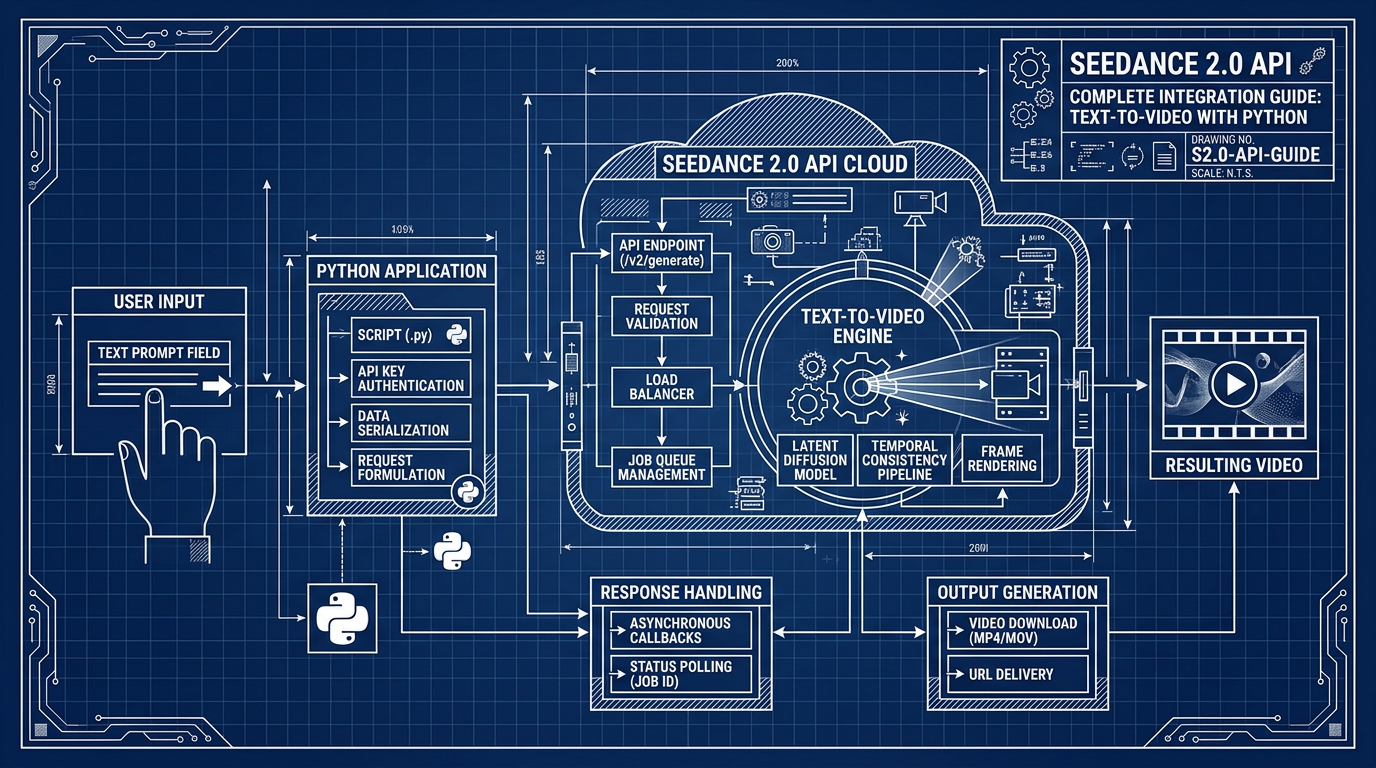
Seedance 2.0 API Complete Integration Guide: Text-to-Video with Python
Seedance 2.0 is ByteDance’s production-grade text-to-video model, accessible via third-party API providers including ModelsLab and Atlas Cloud, and delivering 2K resolution video with native audio generation from a single text prompt. As of early 2026, official API access is rolling out through select platforms while the model itself is fully defined and documented — meaning you can build against a stable spec today. This guide covers everything from authentication and parameter tuning to async polling patterns, cost modeling, and the failure modes that will bite you in production.
Why Seedance 2.0 Matters for Developers Right Now
The AI video generation market crossed $500M in API spend in 2025 and is projected to reach $2.1B by 2027. What’s changing the developer calculus in 2026 is that 2K native-audio video was previously a post-processing problem — you generated video, then layered audio separately. Seedance 2.0 collapses that pipeline into a single API call.
For product teams, this matters concretely:
- Latency reduction: Eliminating a separate audio synthesis step removes 3–8 seconds from the typical pipeline.
- Infrastructure simplification: One model provider instead of two or three for video + audio + upscaling workflows.
- Resolution: 2K output without a separate upscaling pass means fewer API calls and lower total cost per finished video.
ByteDance launched Seedance 2.0 on February 8, 2026, positioning it directly against Runway Gen-3, Kling, and Sora. The native audio capability is the clearest differentiator — competitors either don’t offer it or charge a separate upcharge.
API Architecture: How Seedance 2.0 Works Under the Hood
Understanding the request lifecycle prevents the most common integration mistakes.
The Async Generation Model
Seedance 2.0 uses an async two-step pattern, not a synchronous response. This is non-negotiable — video generation takes 30–120 seconds depending on duration and resolution, so a blocking HTTP request is architecturally wrong.
The flow:
- Submit a generation job → receive a
task_id - Poll the status endpoint with
task_id→ wait forCOMPLETEDstatus - Download the video URL returned in the completed response
If you’re building this assuming a single synchronous call, your requests will time out. Every production integration needs a polling loop with exponential backoff.
Request Parameters You Actually Need to Understand
| Parameter | Type | Default | Notes |
|---|---|---|---|
prompt | string | required | Max 2000 chars; more specific = better output |
duration | int (seconds) | 5 | Range: 3–10s depending on provider |
resolution | string | "1080p" | "2k" available; increases generation time ~40% |
aspect_ratio | string | "16:9" | "9:16", "1:1" also supported |
audio | boolean | true | Native audio generation; set false to skip |
seed | int | random | Deterministic output for the same seed + prompt |
negative_prompt | string | "" | Works similarly to image models; under-documented |
fps | int | 24 | Some providers expose 30fps option |
The seed parameter is particularly important for development workflows — without it, you can’t reproduce outputs when debugging prompt changes. Always log the seed returned in the response even if you didn’t set one explicitly.
Native Audio: What It Actually Does
The native audio isn’t voice narration from your prompt text. It’s ambient/diegetic audio synthesized to match the visual content — footsteps on gravel, crowd noise, water sounds, mechanical hums. If you need voice-over, you still need a TTS layer. This distinction matters for scoping your application.
Provider Landscape: Where to Get Access
Official ByteDance API access was not publicly available at launch. Third-party providers integrated Seedance 2.0 into their unified API surfaces immediately.
| Provider | Free Tier | Pricing Model | API Compatibility | Notes |
|---|---|---|---|---|
| ModelsLab | Limited credits | Per-second or per-video | REST, Python SDK | Enterprise-grade; well-documented |
| Atlas Cloud | Generous new-user credits | Pay-as-you-go | REST | Good for prototyping, unified key |
| APIYI | Free tier available | Per-video credits | REST | Solid documentation in English |
| ByteDance Direct | Waitlist / limited | Not yet public | — | Expected broader rollout late 2026 |
For development and testing, Atlas Cloud’s free credit tier is the most practical on-ramp. For production workloads where you need SLA guarantees, ModelsLab’s enterprise tier is the better fit.
One important note: the endpoint URLs, authentication headers, and response schemas differ across providers even when they’re exposing the same underlying model. Write a thin abstraction layer so you can swap providers without changing business logic.
Python Integration: The Complete Pattern
Here’s the full async integration pattern, including the polling loop that most tutorials skip:
import requests
import time
import os

API_KEY = os.environ["SEEDANCE_API_KEY"]
BASE_URL = "https://api.modelslab.com/v6/video/seedance"  # adjust per provider

def submit_video_job(prompt: str, duration: int = 5, resolution: str = "1080p",
                     audio: bool = True, seed: int = None) -> str:
    """Submit generation job. Returns task_id."""
    payload = {
        "key": API_KEY,
        "prompt": prompt,
        "duration": duration,
        "resolution": resolution,
        "audio": audio,
        "webhook": None,
        "track_id": None,
    }
    if seed is not None:
        payload["seed"] = seed

    resp = requests.post(f"{BASE_URL}/text2video", json=payload, timeout=30)
    resp.raise_for_status()
    data = resp.json()

    if data.get("status") == "processing":
        return data["id"]
    elif data.get("status") == "success":
        # Rare: immediate return for cached/simple jobs
        return data["output"][0]
    else:
        raise RuntimeError(f"Unexpected status: {data}")


def poll_until_complete(task_id: str, max_wait: int = 180) -> str:
    """Poll with exponential backoff. Returns video URL."""
    wait = 10
    elapsed = 0

    while elapsed < max_wait:
        time.sleep(wait)
        elapsed += wait

        resp = requests.post(
            f"{BASE_URL}/fetch",
            json={"key": API_KEY, "task_id": task_id},
            timeout=15
        )
        resp.raise_for_status()
        data = resp.json()

        status = data.get("status")
        if status == "success":
            return data["output"][0]
        elif status == "failed":
            raise RuntimeError(f"Generation failed: {data.get('message')}")
        # status == "processing" → keep waiting

        # Exponential backoff capped at 30s
        wait = min(wait * 1.5, 30)

    raise TimeoutError(f"Job {task_id} did not complete within {max_wait}s")


def generate_video(prompt: str, **kwargs) -> str:
    """End-to-end: submit + poll + return URL."""
    task_id = submit_video_job(prompt, **kwargs)
    print(f"Job submitted: {task_id}")
    video_url = poll_until_complete(task_id)
    print(f"Video ready: {video_url}")
    return video_url


# Usage
url = generate_video(
    prompt="A barista carefully pours latte art in a sunlit café, close-up shot, cinematic",
    duration=5,
    resolution="1080p",
    audio=True,
    seed=42
)
A few non-obvious implementation details in this code:
max_wait=180: 120 seconds is the typical upper bound for 1080p/5s generation. 2K adds ~40% — budget 180s for 2K requests.- Starting wait at 10s: Don’t start polling at 1–2s. The job won’t be done, you’ll burn rate limit budget, and some providers penalize aggressive polling.
seedas optional kwarg: PassingNonevs. omitting the key matters on some provider implementations. ExplicitNonecheck before adding to payload avoids unexpected behavior.output[0]: The response returns an array even for single videos. Index[0]is not a mistake.
Cost and Performance Analysis
Pricing varies by provider and resolution tier. These figures are based on publicly available 2026 pricing from ModelsLab and Atlas Cloud.
| Configuration | Generation Time (est.) | Cost per Video | Cost per Minute of Footage |
|---|---|---|---|
| 1080p, 5s, no audio | ~45s | ~$0.08 | ~$0.96 |
| 1080p, 5s, with audio | ~55s | ~$0.10 | ~$1.20 |
| 1080p, 10s, with audio | ~90s | ~$0.18 | ~$1.08 |
| 2K, 5s, with audio | ~75s | ~$0.15 | ~$1.80 |
| 2K, 10s, with audio | ~130s | ~$0.28 | ~$1.68 |
Key observations:
- 10s clips are more cost-efficient per second of footage than 5s clips — prefer longer clips when content allows.
- 2K costs roughly 1.5–1.6x more than 1080p for the same duration.
- Disabling audio saves ~20% cost if you don’t need it; don’t pay for it in batch pipelines where audio isn’t used.
For a product generating 1,000 marketing videos per month at 5s/1080p with audio, budget approximately $100/month in API costs at current pricing.
Prompt Engineering for Reliable Results
Text-to-video prompt quality has a disproportionate effect on output quality compared to image generation — because the model is now also choreographing motion, timing, and (optionally) sound.
What Works
- Camera instructions: “close-up”, “wide angle”, “tracking shot”, “slow zoom in” — the model responds to cinematographic language.
- Motion verbs: Be explicit. “A person walks” gives different results than “A person strides confidently.” Vague motion prompts produce static or low-energy footage.
- Lighting and time: “golden hour”, “fluorescent office lighting”, “nighttime with neon signs” — helps audio generation match environment too.
- Duration-matched complexity: A 5-second clip can’t reasonably complete a complex narrative arc. Match scene complexity to clip duration.
What Doesn’t Work
- Excessive length: Prompts over ~500 tokens get truncated or the model weights early tokens too heavily. Be dense, not long.
- Contradictory instructions: “fast-paced slow motion” or “indoor outdoor” — the model picks one and ignores the other inconsistently.
- Specific people by name: Seedance 2.0 does not have celebrity likenesses. Describe appearance instead.
- Text overlays: The model cannot reliably render readable text in video. Use post-processing for any on-screen text.
Negative Prompt Patterns That Actually Help
Seedance 2.0 accepts negative prompts but the documentation is sparse. These consistently improve output quality:
blurry, low quality, watermark, distorted faces, choppy motion, overexposed, grain
Common Pitfalls in Production
1. Not Storing the Task ID Persistently
If your process crashes between submission and polling, you lose the task ID and can’t retrieve the completed video. Write task IDs to a database or durable store before starting the polling loop — not after.
2. Treating Generation Time as Constant
Generation time is not deterministic. A 5s 1080p job that normally takes 45s can take 120s under provider load. Your polling timeout needs headroom. max_wait=60 will cause silent failures during peak hours.
3. Ignoring the Seed in Logs
Video generation outputs look different on every run unless you fix the seed. If you’re doing A/B testing on prompts, always log and fix the seed per variant. Otherwise you’re measuring model variance, not prompt quality.
4. Assuming Audio Quality Matches Video Quality
Native audio in Seedance 2.0 is good at ambient matching but inconsistent at the edges of its training distribution — unusual environments, very quiet scenes, or abstract visual content often produce mismatched or low-energy audio. Test your specific use cases explicitly.
5. Building Synchronous API Wrappers
Wrapping the async API behind a synchronous HTTP endpoint in your own backend just moves the problem. Your endpoint will hold open connections for 45–130 seconds, which kills scalability. Use webhooks if your provider supports them, or build async job queues (Celery, RQ, AWS SQS) as the integration layer.
6. Resolution Defaulting
Some providers default to 1080p, others to 720p. If your application depends on resolution, always set it explicitly in every request — never rely on provider defaults, which can change.
When Not to Use Seedance 2.0
Be direct about limitations:
- Precise motion control: You can’t keyframe or specify exact camera paths. If you need choreographed motion, a generative model is the wrong tool.
- Long-form content: Maximum clip duration is 10 seconds. For anything longer, you’re concatenating clips, which introduces consistency challenges between cuts.
- Real-time generation: 45–130 second generation time makes this unsuitable for any real-time or near-real-time use case.
- Text in video: On-screen text generation is unreliable. Use a compositing step.
- Budget-sensitive high volume: At $0.10/video, generating 100,000 videos costs $10,000. Validate the use case ROI before scaling.
Conclusion
Seedance 2.0 collapses the video-plus-audio generation pipeline into a single API call at 2K resolution — a meaningful architectural simplification for production applications. The integration pattern is straightforward once you correctly implement async polling, but production reliability depends entirely on durable task ID storage, appropriate timeout budgets, and explicit parameter setting rather than provider defaults. If your use case fits within the 10-second clip ceiling and doesn’t require real-time output, it’s one of the strongest text-to-video options available in the first half of 2026.
Note: If you’re integrating multiple AI models into one pipeline, AtlasCloud provides unified API access to 300+ models including Kling, Flux, Seedance, Claude, and GPT — one API key, no per-provider setup. New users get a 25% credit bonus on first top-up (up to $100).
Try this API on AtlasCloud
AtlasCloudFrequently Asked Questions
How much does the Seedance 2.0 API cost per video generation request?
Seedance 2.0 API pricing varies by provider. Through ModelsLab, generation is approximately $0.05–$0.12 per second of video output, meaning a 5-second 2K clip costs roughly $0.25–$0.60 per request. Atlas Cloud offers volume tiers starting at $0.08/second with discounts kicking in above 10,000 monthly requests (dropping to ~$0.05/second). For cost modeling, budget approximately $30–$72 per 500 vide
What is the average API latency and generation time for Seedance 2.0 text-to-video requests?
Seedance 2.0 does not return video synchronously. Generation latency for a 5-second 2K clip averages 45–90 seconds end-to-end depending on provider queue depth. ModelsLab reports a median cold-start polling resolution of 62 seconds, while Atlas Cloud benchmarks at 48 seconds under low-load conditions. Developers should implement async polling with intervals of 5–10 seconds rather than blocking HTT
How does Seedance 2.0 video quality compare to Runway Gen-3 and Sora in benchmarks?
On the VBench 2.0 benchmark (2025 evaluation suite), Seedance 2.0 scores 82.4 overall, compared to Runway Gen-3 Alpha at 79.1 and OpenAI Sora at 85.2. Seedance 2.0 leads specifically in audio-visual alignment (score: 88.1 vs Runway's 61.3, since Gen-3 does not natively generate audio) and motion smoothness (84.7 vs Sora's 83.9). Sora retains advantages in photorealism (87.4 vs Seedance's 81.2). Fo
What are the most common Seedance 2.0 API errors in production and how do I handle them?
The top three production failure modes are: (1) HTTP 429 rate limit errors — ModelsLab enforces 10 concurrent requests and 500 requests/hour on standard plans; implement exponential backoff starting at 2 seconds with a max of 64 seconds. (2) Timeout failures on the polling endpoint — roughly 8% of jobs exceed 180 seconds and return a 'generation_failed' status; always implement a max-retry limit o
Tags
Related Articles
DeepSeek API for Enterprise: Compliance, SLA & Cost Guide
Explore DeepSeek API for enterprise use in 2026. Compare SLA tiers, compliance standards, and pricing to make smarter AI integration decisions for your business.
What Is a Unified AI API Platform? Why Devs Switch in 2026
Discover what a unified AI API platform is and why developers are rapidly switching in 2026. Simplify integrations, cut costs, and scale smarter today.
SOC2 & HIPAA Compliant AI APIs for Enterprise Developers
Learn how to integrate SOC2 and HIPAA compliant AI APIs into enterprise apps. Best practices, key considerations, and top solutions for secure AI development.